Progress Bars Throughout History
Share this project


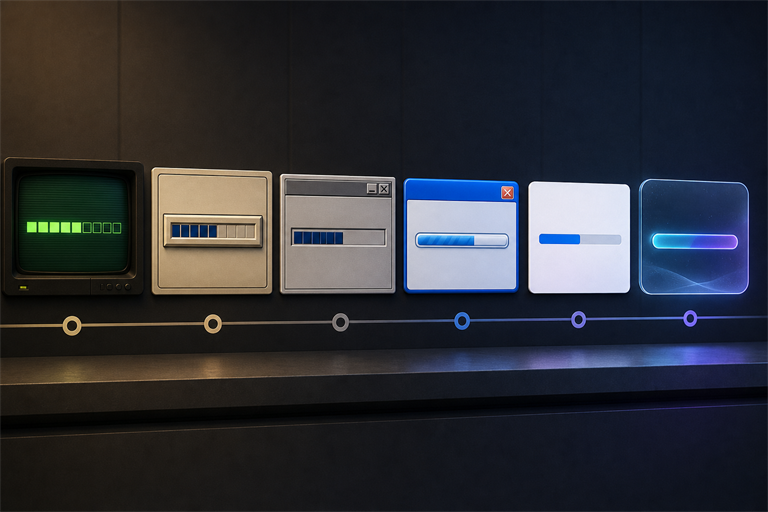
A browser-based tour through 55 years of progress bars, from early terminal feedback and classic desktop widgets to glassy mobile indicators and modern AI-era loading rituals.
Progress Bars Throughout History is exactly what it says on the tin: a little browser museum for one of computing’s most ordinary interface elements.
The progress bar is easy to ignore until it lies to you, freezes at 99%, or spends twenty minutes pretending to copy a file that clearly offended the operating system. I wanted to see how that tiny rectangle evolved across terminals, desktop environments, major mobile systems, and the current era of glassy everything.
So I rebuilt 76 of them.
Live Demo
Use the arrow keys to move around, or press Space to pause the parade. If you already know which year you want to suffer through, append ?year=1995 to the URL and jump straight there.
Why Progress Bars?
Because progress bars are tiny history lessons.
They tell you what an operating system thinks “waiting” should feel like. The earliest examples are blunt: text, percentages, blocks, dots. Then the desktop era arrives and suddenly waiting needs bevels, shadows, striped candy, brushed metal, glowing blue gel, flat design, motion curves, and eventually translucent frosted-glass optimism.
It is a ridiculous amount of design language poured into a widget whose job is, fundamentally, to say: not done yet.
That is the part I like.
The project reconstructs each implementation, as best I can, in plain HTML and CSS. The bars fill over a fixed interval, the player advances chronologically, and the whole thing becomes a twelve-minute tour through the visual habits of computing.
What Is Included
| Era | Count | Examples |
|---|---|---|
| 1970s | 8 | Thompson shell, Xerox Alto, CP/M, Bourne shell, C shell |
| 1980s | 20 | MS-DOS, Mac System 1, Amiga Workbench, NeXTSTEP, Windows 1–2 |
| 1990s | 17 | Windows 3.x / 95, BeOS, KDE 1.0, GNOME 1.0, Mac OS 8 |
| 2000s | 9 | Windows XP, Mac OS X Aqua, iPhone OS 1.0, Android 1.0 |
| 2010s | 16 | iOS 7, Material Design, Windows 8–10, KDE Plasma 5, GNOME 3 |
| 2020s | 6 | macOS Big Sur, Windows 11, Android 12, visionOS, AI-integrated |
The ordering is chronological: year first, command-line interfaces before graphical ones within the same year, then alphabetical after that. This is not because the computer demanded it. This is because I did, and sometimes you have to impose order on the rectangle timeline.
How It Works
- Plain browser stack: HTML, CSS, and vanilla JavaScript. No framework, no build step, no package manager ceremony.
- Modular bars: Each historical entry registers itself with the player, so adding a new bar does not require rewriting the timeline.
- Deterministic ordering: The player sorts entries by year, interface type, and name.
- Keyboard controls:
←and→move through entries, whileSpacepauses and resumes playback. - Deep links:
?year=YYYYjumps directly to the first matching entry for that year. - CRT treatment: Terminal-era bars can opt into a scanline/phosphor effect because green text deserves its moment.
A Few Notes on Fidelity
This is not a screenshot gallery. Every bar is rebuilt as a live browser implementation, which means there is a constant negotiation between historical accuracy and what my CSS skills can sensibly express.
Some systems were easy. A command-line bar made of text characters is refreshingly honest. Others required more interpretation: classic Aqua gloss, Windows XP gradients, early Android indicators, Material motion, and the more recent “the interface is made of frozen light” school of design.
The goal was not museum-grade pixel forensics. The goal was recognizability: if you used the system, the bar should make the correct part of your brain light up.
Why I Built It
Partly because progress bars are everywhere. Partly because UI history is often told through big surfaces: windows, icons, desktops, launchers, shells. Those are important, but the small pieces carry style too.
Also, I enjoy projects with a suspiciously narrow premise that turn out to involve far more research than expected. This one started as “wouldn’t it be funny to compare a few progress bars?” and became a catalog spanning 1971 to 2026.
Last updated on 2026-08-14.