OxideMiner
Share this project


A Rust-native RandomX CPU miner for Monero that prioritizes auditable performance, safe defaults, and operational visibility across pool and solo modes.
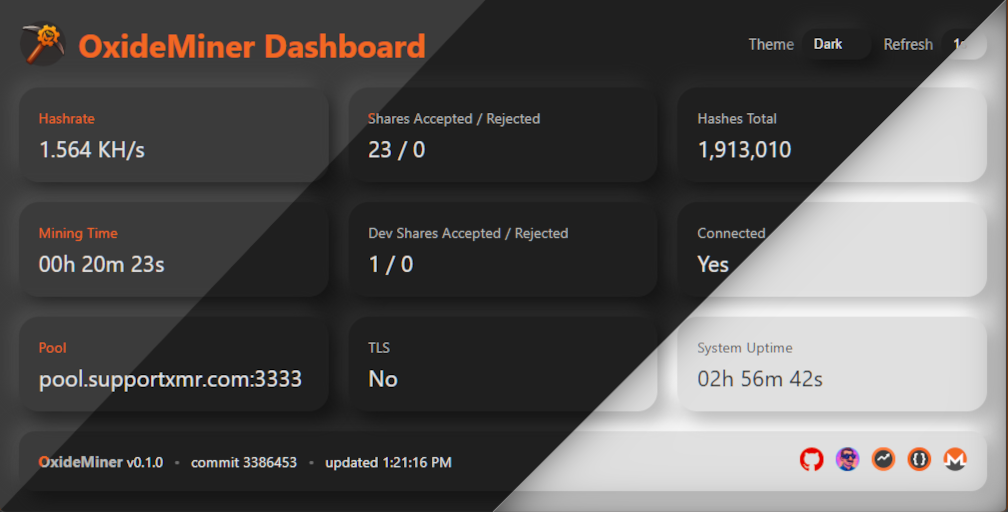
OxideMiner is a Rust-native RandomX CPU miner for Monero (XMR) with a bias toward things I care about as an operator: predictable behavior, clear logs, and enough observability that you do not have to guess what it is doing at 3 AM.
Highlights
- Rust-first mining loop: The hot path is Rust, with tightly scoped
unsafewhere it is unavoidable (RandomX bindings and platform-specific system calls). - Auto-tuning at startup: OxideMiner inspects physical cores, cache topology, available memory, and NUMA context (when available) to choose sensible defaults for threads and batch size.
- Pool and solo mining modes: Mine through stratum pools (
--mode pool) or directly against a localmonerod(--mode solo) with optional ZMQ-driven template refresh. - TLS and proxy hardened pool connectivity:
--tlsuses rustls with optional custom CA files and optional SHA-256 certificate pinning. Pool traffic can also be routed through SOCKS5. - Built-in observability: Optional HTTP server exposes
/metrics(plain text),/api/stats(JSON), and dashboard endpoints. - Theme plugins for the dashboard: Additional themes can be dropped into
plugins/themes/<id>/and loaded at runtime without rebuilding. - Transparent dev fee: A fixed 1% developer fee is always enabled and tracked independently in share counters and metrics.
Quick start
- Download a release artifact for your platform from GitHub Releases.
- Copy
config.toml.exampletoconfig.tomlnext to the binary. - Edit
config.tomlwith your mining settings:- For pool mining: set
mode = "pool"withpoolandwallet - For solo mining: set
mode = "solo"and configure[solo]
- For pool mining: set
- Run the miner:
./oxide-miner
By default, the HTTP server binds to 127.0.0.1. If you need LAN access, add --api-bind 0.0.0.0 and put it behind a firewall or reverse proxy.
If you just want a local sanity check without connecting to a pool or node, run a fixed benchmark:
./oxide-miner --benchmark
Build from source
If you prefer compiling locally, install the Rust toolchain and build the workspace.
- Rust toolchain: rustup (stable channel)
Standard release build (portable)
cargo build --release
./ox-build/target/release/oxide-miner --help
This produces a portable optimized binary suitable for a wide range of CPUs.
High-performance build (still portable)
cargo build --profile maxperf
./ox-build/target/maxperf/oxide-miner --help
This enables more aggressive compiler settings while remaining portable across CPUs.
Host-optimized build (maximum performance)
RUSTFLAGS="-C target-cpu=native" cargo build --profile maxperf
This build is tuned for the machine that compiled it and may not run on other hosts.
Configuration and key flags
OxideMiner supports config.toml and merges it with CLI args. Runtime flags override file settings. The sample file in the repo is a good starting point: config.toml.example.
| Flag | Purpose |
|---|---|
--mode <pool\|solo> |
Mining backend selection (default pool). |
-o, --url <HOST:PORT> |
Mining pool endpoint (pool mode only). |
-u, --user <ADDRESS> |
Primary Monero wallet or subaddress (pool mode only). |
-p, --pass <STRING> |
Pool password/rig identifier (default x). |
-t, --threads <N> |
Override auto-selected worker threads. |
--batch-size <N> |
Manual hashes per batch (default auto recommendation). |
--no-yield |
Disable cooperative yields between batches (less friendly to shared hosts). |
--affinity |
Pin worker threads to CPU cores. |
--huge-pages |
Request large pages for RandomX dataset (requires OS support). |
--proxy <URL> |
Route stratum traffic via SOCKS5 proxy. Format: socks5://[user:pass@]host:port. |
--tls |
Enable TLS for the stratum connection. |
--tls-ca-cert <PATH> |
Add a custom CA certificate (PEM/DER) when TLS is enabled. |
--tls-cert-sha256 <HEX> |
Pin the pool certificate by SHA-256 fingerprint. |
--api-port <PORT> |
Expose the dashboard/API on the given port (paired with --api-bind). |
--api-bind <ADDR> |
Address to bind the HTTP API/dashboard (default 127.0.0.1, only used with --api-port). |
--dashboard-dir <DIR> |
Serve dashboard assets from disk instead of embedded versions. |
--debug |
Increase log verbosity and tee output to rotating files in ./logs/. |
--config <PATH> |
Load defaults from a TOML file (defaults to ./config.toml). |
--benchmark |
Run the RandomX benchmark and exit. |
--node-rpc-url <URL> |
Monerod JSON-RPC endpoint for solo mining. |
--node-rpc-user <USER> |
Monerod JSON-RPC username (HTTP digest auth). |
--node-rpc-pass <PASS> |
Monerod JSON-RPC password (HTTP digest auth). |
--solo-wallet <ADDRESS> |
Wallet address for solo mining (get_block_template). |
--solo-reserve-size <N> |
Reserve size in bytes for solo templates. |
--solo-zmq <URL> |
Optional ZMQ endpoint for monerod events (template refresh on chain/txpool updates). |
Dashboard, themes, and metrics
When --api-port is set, the miner serves:
/for the embedded dashboard UI/metricsfor scrape-friendly counters and gauges/api/statsfor JSON runtime summaries/plugins/themesfor the theme manager page/api/plugins/themesfor a JSON manifest of available themes
Theme plugins live under plugins/themes/ and are discovered automatically from either the current working directory or next to the executable. If you want to author your own theme, start with docs/themes.md.
If you run with --dashboard-dir, OxideMiner serves your files instead of the embedded dashboard. Theme plugins are designed to augment the bundled UI and do not replace a custom dashboard.
Secure downloads
Releases include SHA-256 checksum files and detached signatures. The repository also includes the public signing key at release-subkey-ci-public-20251012.asc.
On Linux:
sha256sum -c <archive>.sha256
gpg --verify <archive>.sha256.asc <archive>.sha256
Only run the miner when checksum and signature verification both succeed.
Responsible usage
- Mine only on systems you own or administer with explicit consent.
- RandomX will run CPUs hot. Watch thermals and power, and validate stability before long runs.
- Keep wallet addresses and pool/node credentials private.
- On shared machines, leave yields enabled and size
--threadsso you do not starve other workloads.
Project Author
Created by @raystanza.
Last updated on 2026-06-20.