Breakfast Squad '95
Share this project


A Lively wallpaper inspired by After Dark's Flying Toasters, with winged breakfast food, pixel trails, and optional desktop antics.
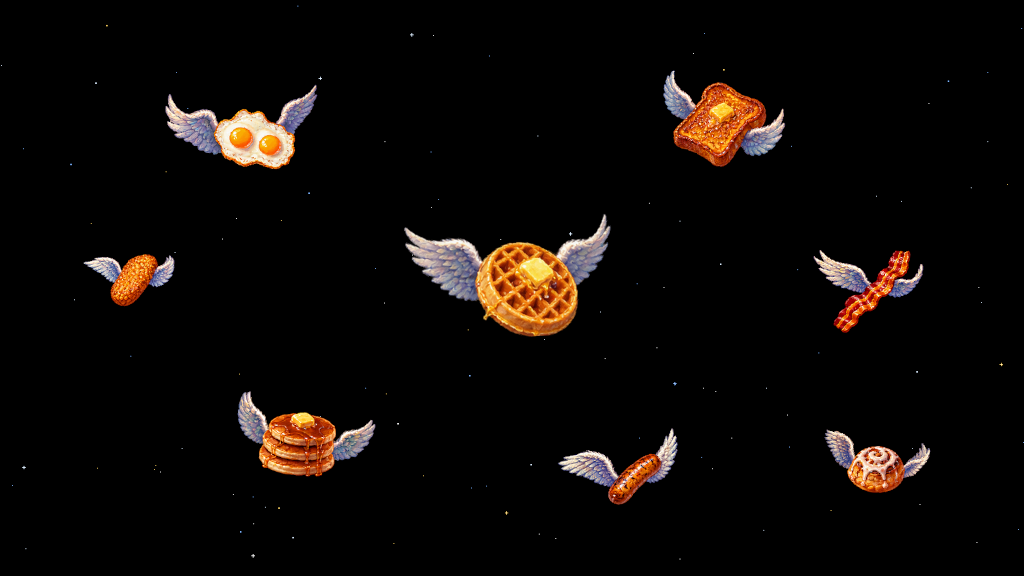
Breakfast Squad ‘95 puts a small airborne breakfast buffet on your desktop. Waffles, eggs, French toast, bacon, sausage, pancakes, hash browns, and cinnamon rolls drift across the screen with wings attached. This is apparently what I wanted my computer to do.
The inspiration is After Dark’s Flying Toasters screensaver. I wanted that same comfortably pointless motion on a modern desktop, so I built a wallpaper for Lively Wallpaper and expanded the menu.
Then I kept adding things. The waffles learned to bank. The sausages acquired barrel rolls. A toaster mothership became somebody’s responsibility.
Meet the Squadron
Every food has its own flight personality. Waffles hold a steady course, eggs wobble and flip, French toast glides, and bacon undulates through the air. Pancakes settle with a little more weight, hash browns recover from jittery detours, and cinnamon rolls perform the corkscrews their shape practically demands.
They can briefly assemble into a V, an echelon, a conga line, a spiral, or an orbiting ring. A few might perch on the screen edge, peek into view, or fall asleep before taking off again. The rest of the traffic carries on around them.
Occasional set pieces include a synchronized flyby, a giant golden waffle, a syrup comet, a fork chase, and the aforementioned toaster mothership. Six rare sightings have their own schedule and cooldowns, so there is something to notice after the ordinary breakfast traffic has become familiar.
All eight food types have individual visibility switches. You can even turn every one off, leaving an empty scene. Breakfast is optional.
Pick a Mood
The default preset is Calm: gentle movement, rare formations, a light crumb trail, and a small breeze around the pointer. The other presets adjust how much is happening:
| Preset | What to expect |
|---|---|
| Classic | The original drifting sprites, with the added behavior and effects switched off. |
| Calm | Subtle personalities and occasional details that sit quietly behind your work. |
| Cinematic | More expressive flight, mixed trails, and regular staged events. |
| Chaos | The busiest event schedule, with frequent formations and rare-character appearances. |
| Music Reactive | Motion and effects that respond to audio, plus accents when the track changes. |
| Midnight Snack | A cool late-night palette, syrup trails, and more activity around the screen edges. |
| System Monitor | Breakfast-themed views of CPU, GPU, memory, and network activity. |
| Custom | Direct control over every individual setting. |
A named preset overrides some of the behavior controls. Switch to Custom to tune those yourself. Background, density, travel speed, sprite size, entry direction, and food visibility always remain adjustable, whichever preset you choose.
A Desktop with a Local Clock
The background can stay black or pick up a sparse or dense star field. Optional depth parallax makes larger sprites travel faster while smaller ones drift behind, and a static CRT scanline overlay adds a little more period atmosphere.
Automatic atmosphere follows the local clock through dawn, day, evening, and midnight, with a subtle weekend brunch variation. You can also hold it at a particular time of day. Enable the breakfast clock and the squadron briefly spells out the hour in a 12- or 24-hour format.
Cursor interaction ranges from a gentle breeze to curious sprites gathering near a resting pointer. The Playful setting adds butter you can place with a click and toaster portals you can open with a double-click.
Music, Memory, and Pancakes
Lively’s optional callbacks let the wallpaper react to system audio and track changes. With no audio input, the scene settles back into ordinary ambient flight. The wallpaper itself produces no sound.
The system monitor can show memory as a pancake stack and CPU load as a filling toaster coil. GPU activity influences wing intensity, while network traffic appears as directional shooting stars. A Readable mode replaces the corner gauges with a compact pixel panel containing numerical values.
These integrations are optional. Missing or stale data fades out, and the wallpaper makes no network calls and never saves callback data to disk.
Keeping Breakfast under Control
The animation runs on a single HTML canvas with no runtime dependencies. Ambient traffic is capped at 24 sprites, and particles come from a fixed pool. If frame times stay slow, adaptive quality reduces optional effects while keeping the core sprite animation running.
Formations, cinematic events, cursor interactions, and screen-edge visitors also have an explicit priority order. A waffle has one job at a time, and it returns to ordinary flight when that job ends. Pausing freezes the animation and event schedules, so resuming does not unleash a backlog of breakfast.
Reduced motion works with every preset. It suppresses flips and barrel rolls, limits travel speed and effects, softens audio response, and turns off star twinkle. A separate Top safe area / toolbar control keeps the action below a desktop toolbar.
Put It on Your Desktop
- Install Lively Wallpaper for Windows.
- Import the packaged Breakfast Squad ‘95 ZIP by dragging it into Lively, or through Add Wallpaper → Browse.
- Open Customize and choose a Behavior preset. Start with Calm, or choose Classic for the plain screensaver feel.
To make the wallpaper ZIP from source, run ./build.ps1 in the project repository. The package is written to dist/Breakfast-Squad-95-v<version>.zip. The README has the full control reference and troubleshooting notes.
The project is MIT-licensed, and the sprite artwork is AI-generated. It is an independent tribute to After Dark’s Flying Toasters, with no affiliation to Berkeley Systems or later After Dark owners.
Last updated on 2026-09-07.