My little guide to SemVer & Conventional Commits
June 06, 2026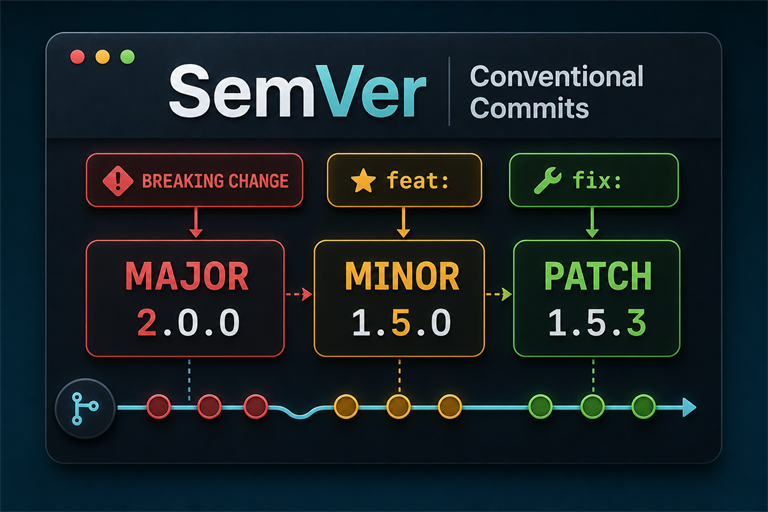
Share this post


“Write programs that do one thing and do it well.” – Doug McIlroy
The Problem with Version Numbers
At some point in your career you will encounter a version number like v2.14.7-final-FINAL-reallyfinal-thistime-forreal. Maybe you wrote it yourself at 11pm on a Friday. No judgment…Been there.
Then there are the corporate release names that sound like they were generated by feeding a thesaurus into a blender (e.g. “Phoenix Cascade Horizon 3: The Reckoning”) and are approximately as useful as a chocolate teapot when you’re trying to figure out if the new version will break your integration.
Or, the absolute classic: no version at all. Just vibes and a git log that goes back to 2017.
Version numbers exist for a reason. They communicate intent. They tell consumers of your code whether an update is safe to install without thinking, whether it might blow up their existing integration, or whether they can grab it on their lunch break without worrying. When version numbers are applied randomly, or by whatever number felt right that day, that communication collapses and everyone suffers. Especially future-you.
Semantic Versioning (SemVer) is the widely adopted fix for this. Pair it with Conventional Commits and you get a system where the version number is derived directly from your commit history, with minimal human fumbling required. Your CI/CD pipeline handles the rest while you go touch grass.
Semantic Versioning: The Three-Number System
SemVer is defined at semver.org and the full spec is worth a read, but the core idea fits in one line:
MAJOR.MINOR.PATCH
Each number has a job:
| Segment | When to increment | Example |
|---|---|---|
| MAJOR | You broke something. Intentionally or otherwise. | 1.0.0 -> 2.0.0 |
| MINOR | You added something nice and didn’t break anything | 1.4.0 -> 1.5.0 |
| PATCH | You fixed something that was quietly on fire | 1.5.2 -> 1.5.3 |
The rules: bump MAJOR and reset MINOR and PATCH to zero. Bump MINOR and reset PATCH to zero. PATCH just goes up by one forever, until it doesn’t.
A project’s life might look like this:
1.0.0  -- initial release (bold of you)
1.0.1  -- a bug fix (something was already broken, as expected)
1.1.0  -- a new feature, backward-compatible (you're on a roll)
1.1.1  -- another bug fix (the roll continues)
2.0.0  -- a breaking change (you've ruined everything, congratulations)
There’s nothing magical about it. The hard part is being disciplined enough to actually apply it consistently instead of just bumping everything to MAJOR because it “feels like a big release.”
What is “version 0.x.x”?
Starting a public API? Begin at 0.1.0. The zero major version is the software equivalent of putting on a sign that says “Under Construction - Enter At Your Own Risk.” It tells the world: this might change at any moment, we have no idea what we’re doing yet, please don’t build a business on this. Once you’re ready to act like a responsible adult, you cut 1.0.0 and the contract begins.
Pre-release Identifiers
SemVer supports pre-release labels appended with a hyphen, for when you want to let the brave (or foolish) test what’s coming:
1.0.0-alpha
1.0.0-alpha.1
1.0.0-beta.3
1.0.0-rc.1
1.0.0
Pre-release versions have lower precedence than the normal release, so 1.0.0-rc.1 is technically older than 1.0.0. This lets you give early adopters a preview without actually promising it works.
Build Metadata
You can also append build metadata with a +:
1.0.0+20260606.sha.5114f85
Build metadata is ignored when comparing versions, so two releases can be the same version with different build metadata and the version comparison tools won’t care. Mostly useful for CI/CD traceability, so you can answer “which exact commit produced this artifact?” at 2am when something is on fire.
Conventional Commits: Structured Commit Messages
Here’s where things get genuinely fun. SemVer tells you what to bump. But how do you determine that automatically, without a human making a judgment call before every release? Enter Conventional Commits.
The Conventional Commits specification is a lightweight standard for commit messages in a format that both humans and tools can parse. The structure:
<type>[optional scope]: <description>

[optional body]

[optional footer(s)]
Some examples:
feat: add dark mode toggle to settings page

fix(auth): prevent login loop on expired session tokens

chore: update Node.js to v22.x

docs: add example configuration to README

feat!: remove support for Python 2.7
That ! after a type (or a BREAKING CHANGE: footer) means you’ve broken the contract, MAJOR version bump incoming. Everyone downstream will know, because you told them via your commit message like a civilized person.
The Conventional Commits Type Reference
Here’s the full cheat sheet. Some types are in the spec; others are widely adopted conventions from tools like commitlint and semantic-release. The key column is the last one, because that’s what drives your version number:
| Type | Description | SemVer Impact |
|---|---|---|
feat |
A new feature your users will actually see | MINOR bump |
fix |
A bug fix your users will silently appreciate | PATCH bump |
docs |
Documentation changes (yes, someone has to write those) | No release |
style |
Formatting, whitespace, tabs-vs-spaces wars, no logic changes | No release |
refactor |
Moving deckchairs around without adding or removing any | No release |
perf |
Made something faster, hopefully without breaking anything | PATCH bump |
test |
Tests! The things that tell you whether your code works! | No release |
build |
Changes to the build system or external dependencies | No release |
ci |
Changes to your CI/CD config (the scripts that run your other scripts) | No release |
chore |
Miscellaneous stuff that doesn’t fit anywhere else | No release |
revert |
You made a mistake and you’re owning it | Depends on what you’re reverting |
feat! or fix! |
Breaking change, ! suffix or BREAKING CHANGE: in footer |
MAJOR bump |
The short version: feat = MINOR, fix/perf = PATCH, anything with ! = MAJOR, everything else is just noise in the best possible way.
Scopes: Optional But Useful
The optional scope in a commit type narrows down which chunk of the codebase you touched. Scopes are project-specific, you just make them up based on what makes sense for your architecture:
feat(api): add endpoint for bulk user creation
fix(ui): correct tab focus order on modal dialogs
build(deps): bump lodash from 4.17.20 to 4.17.21
chore(ci): add caching step for npm dependencies
Scopes show up in auto-generated changelogs grouped by area. This is particularly nice if you have a monorepo or a project with distinct subsystems, where “something changed somewhere” is not quite specific enough to be reassuring.
Breaking Changes
Breaking changes deserve special attention because they’re the version bump that makes downstream developers say bad words. There are two ways to announce that you’ve pulled the rug out:
Method 1: The ! suffix (quick and to the point)
feat!: drop support for the v1 API endpoints
Method 2: The BREAKING CHANGE: footer (for when you want to be thorough and apologetic)
feat: replace legacy config format with TOML

BREAKING CHANGE: The YAML configuration format is no longer supported.
Migrate your config files to TOML before upgrading. See MIGRATION.md for details.
The footer approach is preferred when you want to include the full story of what broke and how to survive it. Automated tools parse the BREAKING CHANGE: token and shove it into its own prominent section of the changelog. Which is fairly useful for anyone upgrading and wondering why nothing works anymore.
Putting It All Together in CI/CD
The real payoff of combining SemVer with Conventional Commits is that your entire release process can be automated. Here’s the dream:
- Developer pushes a commit (or a pile of commits) to the main branch.
- CI picks it up and runs the tests.
- A release tool reads the commit messages since the last tag.
- It figures out the correct version bump based on the types.
- It writes the new version into
package.json,Cargo.toml,pyproject.toml, or wherever your project keeps that number. - It generates or updates your
CHANGELOG.md. - It creates a git tag and a GitHub/GitLab release.
- It publishes the artifact (npm package, Docker image, binary, whatever).
No human has to sit there squinting at a diff and asking “is this a patch or a minor bump?” The commit history already decided. You decided when you wrote the commit message.
semantic-release
semantic-release is the most widely used tool for this in the Node.js ecosystem, though it’ll work with any language if you squint at it right:
npm install --save-dev semantic-release @semantic-release/changelog @semantic-release/git
A minimal .releaserc.json:
{
  "branches": ["main"],
  "plugins": [
    "@semantic-release/commit-analyzer",
    "@semantic-release/release-notes-generator",
    "@semantic-release/changelog",
    "@semantic-release/npm",
    "@semantic-release/git"
  ]
}
With this in place, merging to main kicks off a full release cycle. You don’t have to do anything. That’s kind of the whole point.
GitHub Actions Integration
A minimal workflow that calls semantic-release on every push to main:
name: Release

on:
  push:
    branches:
      - main

permissions:
  contents: write
  issues: write
  pull-requests: write

jobs:
  release:
    runs-on: ubuntu-latest
    steps:
      - uses: actions/checkout@v4
        with:
          fetch-depth: 0

      - uses: actions/setup-node@v4
        with:
          node-version: '22'

      - run: npm ci

      - run: npx semantic-release
        env:
          GITHUB_TOKEN: $
          NPM_TOKEN: $
The fetch-depth: 0 is not optional, it’s a ‘load-bearing’ config line. semantic-release needs the full git history to compare against the last tag. A shallow clone will cause it to fail, or worse, produce confidently wrong results.
Python Projects with python-semantic-release
For Python projects, python-semantic-release does the same job:
pip install python-semantic-release
Configure it in pyproject.toml:
[tool.semantic_release]
version_toml = ["pyproject.toml:tool.poetry.version"]
branch = "main"
changelog_file = "CHANGELOG.md"
build_command = "poetry build"
Then in your GitHub Actions workflow:
- name: Python Semantic Release
  uses: python-semantic-release/python-semantic-release@v9
  with:
    github_token: $
Rust with cargo-release and git-cliff
In the Rust ecosystem, cargo-release combined with git-cliff for changelog generation is the popular pairing. git-cliff is also just a great tool in general if you hate writing changelogs by hand (everyone hates writing changelogs by hand):
cargo install cargo-release git-cliff
git-cliff reads your commit history and generates a CHANGELOG.md from conventional commit types. Configure it in cliff.toml or under [package.metadata.git-cliff] in Cargo.toml.
Enforcing Commit Message Format
Automation only works if the commit messages are actually formatted correctly. And developers, bless us, will absolutely write fix stuff and push it at 4:45pm on a Friday if nothing stops us.
commitlint is the standard bouncer here, operating via a git hook:
npm install --save-dev @commitlint/cli @commitlint/config-conventional husky
npx husky init
echo "npx --no -- commitlint --edit \$1" > .husky/commit-msg
Create a commitlint.config.js:
export default {
  extends: ['@commitlint/config-conventional'],
};
Now if someone tries to sneak in a non-conforming commit message, the hook rejects it before the commit is even created. This is the safety net that keeps the entire machine running.
You can also enforce this at the CI level. For pull requests that use squash-merge workflows (where the PR title becomes the final commit message), lint the PR title itself:
- uses: amannn/action-semantic-pull-request@v5
  env:
    GITHUB_TOKEN: $
What Actually Goes in the Changelog
Automated changelogs from semantic-release or git-cliff group changes by type. A typical generated section looks like this:
## [2.0.0] - 2026-06-06

### Breaking Changes
- Drop support for Node.js versions below 20 (#112)
- Remove deprecated `/v1/` API endpoints (#98)

### Features
- Add webhook support for real-time event delivery (#105)
- Support multiple authentication providers (#101)

### Bug Fixes
- Fix race condition in session cleanup (#108)
- Correct pagination offset in search results (#104)

### Performance
- Reduce startup time by lazy-loading provider modules (#103)
This whole thing was generated from commit messages. The docs, chore, ci, style, refactor, and test commits don’t show up here by default, only the stuff that actually matters to someone on the outside. The result is a changelog that’s readable and useful, rather than an impenetrable wall of “update dependencies” entries.
Quick Tips and Common Mistakes
Write commit messages for the person reading the changelog. The description after the type is what ends up in the release notes. “fix: typo” tells nobody anything. “fix(auth): prevent redirect loop when session token expires” tells the reader exactly what broke and why you touched it. Future-you, six months from now, will be extremely grateful.
Scope your commits to one thing. A commit that touches the API layer, the database schema, and the frontend CSS is not a commit…it’s a small natural disaster. Split it. Your reviewers will thank you. Your git history will thank you. The changelog will actually make sense.
Do not game the types to avoid a version bump. If you have a breaking change and label it fix because you don’t want to cut a major version, you have broken the contract with your users and also lied in writing. The ! exists for a reason. Use it. Own it.
Use revert for reverts. git revert creates a proper revert commit with a sensible message. Prefix it with revert: and the changelog automation handles it correctly. Don’t just quietly push a “fix” that undoes your earlier “fix” and hope nobody notices.
Version 0.x.x differently. In the 0.x.x range, some teams treat MINOR bumps as effectively MAJOR, since the whole point of 0.y.z is “no stability guarantees, enter at your own risk.” Check your tooling’s configuration, semantic-release supports a prerelease mode for this situation.
Quick Reference: Reading the Version Number
When you encounter a version number in the wild and need to decide if clicking “Update” is going to ruin your afternoon:
| Version change | What it means for you |
|---|---|
1.2.3 -> 1.2.4 |
Safe to update. Something was quietly broken and is now less broken. |
1.2.3 -> 1.3.0 |
Safe to update. New features appeared. You can ignore them if you want. |
1.2.3 -> 2.0.0 |
Read the changelog before updating. Something that worked before might not. Have a rollback plan. |
1.0.0-beta.1 -> 1.0.0 |
The thing you were bravely testing is now officially stable. Probably. |
Wrapping Up
SemVer and Conventional Commits are not some arcane DevOps religion. They’re just a shared language for communicating what changed and how much you should care. Three numbers with clear rules. A commit message format you can teach a new team member in 15 minutes (It’s an average, but roughly 15).
The payoff lands when you wire them into a pipeline. Releases become boring in the best possible way: predictable, consistent, fully traceable, and handled by robots while you focus on actual work. Your team stops having the weekly “is this a minor or a major?” argument. Your changelog writes itself. Downstream users know immediately whether an upgrade is safe without having to read source code like some kind of archaeologist.
If you haven’t used either of these standards before, start with the commits. Just start writing your commit messages in the conventional format. Build the habit. Get the team on board. Then add the automation. The tooling is mature, well-documented, and genuinely delightful once it’s running.