Migrating from LAMP to AWS
January 08, 2024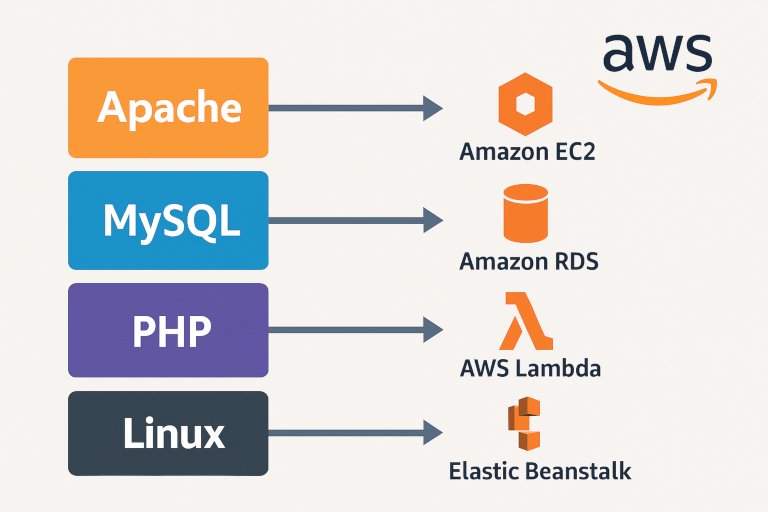
Share this post


Linux (Compute Foundation)
Amazon EC2
- Use-case: Lift-and-shift or custom AMI deployments
- Why: Full control over OS, networking, and installed software
-
Notes:
- Autoscale groups for horizontal scaling
- Use EC2 Auto Recovery and EC2 Image Builder for resilience and patch management
- Secure via IAM roles, security groups, and Session Manager instead of SSH
- Learn more: EC2 User Guide • EC2 Details
AWS Elastic Beanstalk
- Use-case: Managed platform for PHP / Apache workloads
- Why: Simplifies deployments (just upload code), handles provisioning, scaling, updates
-
Notes:
- Supports rolling deployments and blue/green swaps
- Provides health dashboards and event logs
- Learn more: Elastic Beanstalk Developer Guide • Elastic Beanstalk Details
AWS Fargate & Amazon ECS/EKS
- Use-case: Containerized LAMP components
- Why: Serverless containers (Fargate) or orchestrated clusters (ECS/EKS)
-
Notes:
- Decouple compute from code, faster deployments
- Integrate with Application Load Balancer and AWS App Mesh
AWS Lambda
- Use-case: Serverless PHP via Lambda Layer (e.g., Bref) or micro-services
- Why: No servers to manage, pay per execution
-
Notes:
- Combine with API Gateway for REST/HTTP endpoints
- Cold-start latency considerations for PHP
Apache (Web & Delivery)
Elastic Load Balancing (ELB)
- Use-case: Distribute HTTP(s) traffic across EC2, containers, or Lambda
- Why: Built-in health checks, SSL offload, sticky sessions
- Learn more: ELB Details
Amazon CloudFront
- Use-case: CDN for static assets (CSS, JS, images) and dynamic content caching
- Why: Low latency, edge security (WAF integration), custom SSL
- Learn more: CloudFront Details
Amazon S3 for Static Hosting
- Use-case: Host images, media, or even a static single-page front end
- Why: 99.99% durability, lifecycle policies, origin for CloudFront
- Learn more: S3 User Guide
MySQL (Data Layer)
Amazon RDS for MySQL
- Use-case: Managed MySQL with automated backups, patching, and replicas
- Why: High availability via Multi-AZ, automated snapshots, easy scaling
- Learn more: RDS User Guide • RDS Details
Amazon Aurora (MySQL-Compatible)
- Use-case: High-performance, serverless, or provisioned cluster
- Why: Up to 5× the throughput of standard MySQL, read replicas, Global Database
- Learn more: Aurora Details
Amazon DynamoDB
- Use-case: NoSQL for sessions, user profiles, or metadata
- Why: Single-digit millisecond latency, serverless scaling
- Learn more: DynamoDB Details
Amazon ElastiCache
- Use-case: In-memory cache with Redis or Memcached
- Why: Offload read traffic, accelerate session stores, full-page caching
- Learn more: ElastiCache User Guide
PHP (Application Runtime)
Running PHP on AWS
- EC2 / Beanstalk: Full Apache + PHP-FPM stacks
- ECS/Fargate: Dockerized PHP containers
- Lambda (Bref): PHP via Lambda layers for event-driven tasks or APIs
Dependency Management & CI/CD
- AWS CodePipeline / CodeBuild: Automate build, test, and deploy of Composer projects
- AWS CodeDeploy: Blue/green or canary deployments to EC2/ECS/Beanstalk
- Learn more: AWS CodePipeline User Guide
Networking & Security
- Amazon VPC: Isolate your resources in private and public subnets
- Security Groups & NACLs: Fine-grained network access controls
- AWS IAM: Least-privilege roles for EC2, Lambda, RDS, etc. IAM User Guide
- AWS WAF & Shield: Protect against common web attacks (SQLi, XSS) and DDoS
Observability & Maintenance
- Amazon CloudWatch: Metrics, logs, and alarms for EC2, RDS, Lambda, ELB, and custom PHP logs CloudWatch User Guide
- AWS X-Ray: Distributed tracing for PHP applications to pinpoint performance bottlenecks
- AWS Backup: Centralized backup for RDS, EFS, DynamoDB, and EC2 volumes AWS Backup User Guide
Scalability & High Availability
- Auto Scaling Groups: Scale EC2 / ECS tasks based on CPU, memory, or custom metrics Auto Scaling User Guide
- Aurora Serverless: Automatically scales the database compute layer
- Global Accelerator: Low-latency, regional failover for global audiences
Cost Optimization
- Reserved & Savings Plans: Commit to 1–3 years for significant EC2, Lambda, and RDS discounts
- Spot Instances: Run non-critical batch jobs or container tasks at up to 90% off
- S3 Lifecycle: Move infrequently accessed objects to Glacier Deep Archive
Reference Architectures
- Simple Web App: EC2 + ELB + RDS (MySQL) + CloudFront + S3
- Containerized Microservices: ECS/Fargate + ALB + Aurora Serverless + DynamoDB + X-Ray
- Serverless Backend: API Gateway + Lambda (PHP via Bref) + DynamoDB + CloudFront
For more information check the AWS Solutions Library.
By mapping each LAMP component to its AWS equivalent-and supplementing with security, scalability, and observability services-you can build a cloud-native architecture that’s more resilient, easier to manage, and ready to grow with your traffic.
Links
- EC2 Instances Setup: EC2 User Guide
- Set Up RDS for MySQL: RDS User Guide
- Implement Elastic Beanstalk: Elastic Beanstalk Developer Guide
- Serverless with Lambda and API Gateway: Lambda Developer Guide and API Gateway Developer Guide
- Amazon S3: S3 User Guide
- IAM for Security: IAM User Guide
- Backup and Disaster Recovery: AWS Backup User Guide
- Scalability and High Availability: Auto Scaling User Guide
- Monitoring and Logging: CloudWatch User Guide
- CI/CD Integration: AWS CodePipeline User Guide